
Search the App Store for "vinyl" and you get a wall of apps that look almost identical. Most launched in the last few months, none have many real reviews, and a fair share are AI-generated wrappers around the same Discogs API everyone else uses. The genre is crowded with noise.
This guide cuts through it. Seven apps that actually solve real problems collectors have, grouped by what each does best, with a clear pick for each kind of collector. One upfront note: I built one of them, called Analog, and it gets the same treatment as the others.
Most differences between cataloging apps are smaller than the marketing suggests. They all sync with Discogs, they all scan barcodes, they all hold a collection. What separates them is what each app lets you do beyond the catalog. That's what this guide is about.
1. Discogs Official: Where Everyone Starts
The Discogs iPhone app is the official client for the world's largest physical music database, and every collector ends up with it whether they intend to or not. Free, around 67,000 ratings averaging 4.8 stars, updated every few weeks.
It does three things well. The database itself is the canonical reference for physical music, with millions of releases catalogued down to specific pressings. The marketplace is built in, so you can browse seller inventory worldwide and place orders from your phone. And the price checker shows the minimum, median, and maximum prices for any release based on real Discogs sales history. That last bit is the closest thing to a real-world valuation you have access to, and no third-party app replicates it cleanly.
Where it falls down is the management side. Read the recent reviews and the pattern is consistent: the app crashes mid-session, logs users out, and is unreliable when you try to edit list items or update condition notes from the phone. The web works, but the app makes you switch over to it constantly. For casual collectors with a few dozen records, none of this matters. For anyone actively managing a real collection, the friction adds up to a real reason to want a second app.
The verdict: install it. Connect it to your account. Treat it as your reference and your marketplace. If you do nothing else, this alone is enough for casual collectors. For everyone else, the rest of this guide is about which app you should pair it with.
2. VinylBox: The Best Discogs Companion
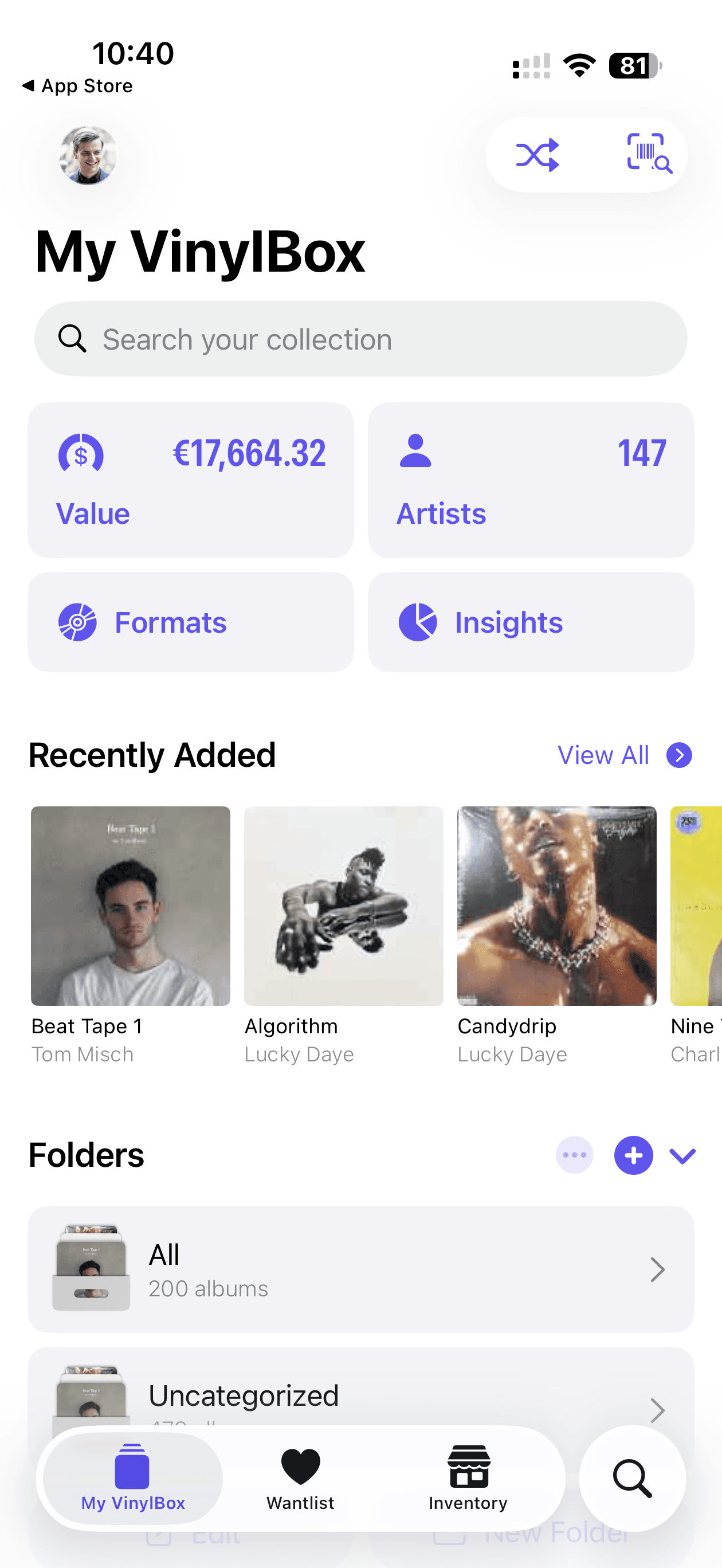
Top pick. VinylBox is what I personally pay for, and it is what I recommend first to any collector who has outgrown the official Discogs app. Free with a Pro subscription at $0.99 to $1.99 a month, around 2,800 ratings averaging 4.7 stars, iPhone and iPad, built by Daven Gomes since 2017 as an active solo project. The most recent update added Last.fm support.
The interface is faster to navigate than the official Discogs app, the barcode scanner is quick and accurate, and the collection view sorts and filters the way you actually want it to. That alone would justify the recommendation, but three specific features are the reason to pay for Pro.
The first is Shazam integration. Tap the listening icon, point your phone at any speaker playing any music, and VinylBox identifies the album and offers to add the matching vinyl, CD, or cassette pressing to your collection or wantlist. Hear something at a friend's house, in a café, on a podcast soundtrack, and add it to your wantlist in five seconds without typing anything.
The second is selling. VinylBox lets you list items to the Discogs Marketplace directly from your phone, with price suggestions based on recent comparable sales, condition-grade pickers, and full marketplace order management. The same sale that used to require a laptop session is now a dozen taps and done.
The third is the small things that compound. Home Screen widgets that show a random record from your collection (a quiet nudge to play something you haven't touched in months) or track the live price of a record on the marketplace. Custom folders and tags that actually work. Condition grades, purchase price, purchase notes per item. An in-app media player to preview records before buying. Multiple-account support if you manage more than one collection. None of these alone is the reason to install VinylBox; together, they are why it stays installed.
VinylBox connects to your existing Discogs account, so there is no migration to do. Sign in, your collection and wantlist sync, and within an hour you are operating an upgraded version of the same data the Discogs app shows you.
Honest limits: iPhone and iPad only, no Android or Mac. The Pro subscription is closer to required than optional if you actually sell records or use the widgets seriously. And the catalog data is only as good as Discogs itself, so a release that is misfiled in the database is misfiled in VinylBox too.
If you only adopt one app from this guide beyond Discogs Official, this is the one. The free tier is enough to know within a week whether Pro is worth it. For active collectors, it almost always is.
3. Discographic: The One-Time-Payment Alternative
Discographic is the app to choose if you dislike subscriptions or want offline access that genuinely works. Around 416 ratings averaging 4.7 stars, free with a one-time Pro upgrade, iPhone and iPad, developed by Oscar Adan (Fluido Digital) since 2015. Eleven years of continuous development by a single person who is unusually responsive in the reviews.
Two things make it the right pick over VinylBox in specific cases. First, you pay once and never again. Pro is a single purchase that carries forward across years of updates; users who bought a long-time ago still get the new features. If recurring billing fatigue is real for you, this is the app that solves it.
Second, full offline support is the design goal. Your collection, wantlist, marketplace prices, and sales history are all cached locally so the app works in a basement record store with no cell signal. Every screen you'd want when standing in a shop loads instantly from local data, with no waiting on the network.
Beyond those two, Discographic includes built-in Apple Music and Spotify players for previewing tracks, Last.fm scrobbling, dark mode, and data export to spreadsheet. It is also available in twenty-seven languages, more than the rest of this guide combined.
The interface is more conservative than VinylBox. It looks like 2019 rather than 2026, which is either a feature (familiar, predictable) or a flaw (less visually polished) depending on your taste. There is no Shazam-style album identification, and the marketplace selling UX is functional but less refined than VinylBox's.
For collectors who want a mature, stable, no-subscription Discogs companion, Discographic is the right answer.
4. CLZ Music: For Cross-Platform Power Users
CLZ Music is the only app on this list that works across every device. iOS, Android, Mac, Windows, and a web app, all syncing through CLZ Cloud. Around 1,300 ratings averaging 4.8 stars on iOS, $1.99 a month or $19.99 a year with a seven-day trial. CLZ has been making collection database software since 1996, and it shows.
What CLZ uniquely enables is the cross-platform workflow. The same database is on your iPhone, your iPad, your Mac at the desk, and any browser you log into. Edits sync within seconds. For collectors with a desk-based workflow (batch-editing fields, generating reports, browsing on a big screen) alongside the phone-based one, this is the only app that gives you both ends cleanly. The web viewer also lets you share a public view of your collection, which no other app on this list does as nicely.
CLZ can use either its own curated music database or Discogs as the lookup source. The CLZ Core database is often cleaner for mainstream releases with fewer duplicate entries; Discogs is deeper for obscure pressings. Either works.
The trade-offs are real. CLZ is the most demanding app on this list to set up; you need a CLZ Cloud account and some patience with the interface, which is dense and built for power users rather than casual ones. It feels more like a tool than an experience. And among the apps in this guide, CLZ collects the most data about how you use it.
If you work across devices and want your collection available everywhere, CLZ is the right and possibly only choice. If you only collect on a phone, VinylBox is simpler and probably enough.
5. Multi-Format Catalogs: MusicBuddy and iCollect Music
Some collectors catalog more than vinyl. Vinyl alongside CDs, CDs alongside cassettes, sometimes books, movies, and games on the other side of the shelf. For these collectors, a Discogs-only app is the wrong shape. Two well-established multi-format options exist.
MusicBuddy
MusicBuddy tracks vinyl, CDs, and cassettes from one app. Free with a one-time in-app purchase to unlock unlimited storage beyond a 50-album free tier, around 990 ratings averaging 4.78 stars, last meaningfully updated in January 2026. It is a universal app, so one purchase covers iPhone, iPad, and Mac with Apple Silicon, with sync via iCloud or Dropbox.
The killer features are the categories most other apps skip: My Albums, Wishlist, Borrowed (with optional borrower contact), and Previously Owned. Most collectors have lent at least one record they wished they remembered the location of. Most have sold at least one they wished they had kept. MusicBuddy is the only app on this list that lets you track both cleanly. Adding items works through barcode scanning, UPC entry, keyword search, manual entry, or CSV import.
For collectors who want a no-nonsense multi-format catalog with iCloud sync and a one-time payment, MusicBuddy is the pick.
iCollect Music
iCollect Music takes the multi-format idea further. It is part of the iCollect Everything family, which catalogs music, movies, books, comics, video games, and more from the same developer using shared sync. Around 1,200 ratings averaging 4.5 stars, free with in-app purchases for unlimited storage.
The strength is what you can store per item: up to four pictures including front, back, and inside spreads, plus fields for purchase price, purchase date, personal rating, storage location, free-text notes, and estimated value. For collectors with high-value records where photographic documentation matters, iCollect is the most archival-friendly app on this list. It can also import directly from CLZ Music, MusicBuddy, and Discogs, which makes it useful for mid-migration consolidation.
The pick between the two: MusicBuddy for vinyl-and-CD collectors who want a clean catalog. iCollect Music for collectors who also keep movies, books, comics, or memorabilia and want one ecosystem for everything.
6. Record Scanner: For Hunting in the Wild
The catalog apps above are designed around managing the records you own. There is a different use case they don't quite serve: the moment in a record store, an estate sale, or a flea market where you are holding a record you do not own, deciding fast whether to buy it.
Record Scanner is built for that moment. Around 1,700 ratings averaging 4.8 stars on iOS, also available on Android (one of the few apps in this guide outside CLZ with real cross-platform support). Subscription-based, free with a collection limit. Developed by a small team that includes a DJ and a music producer, and the design reflects that lineage.
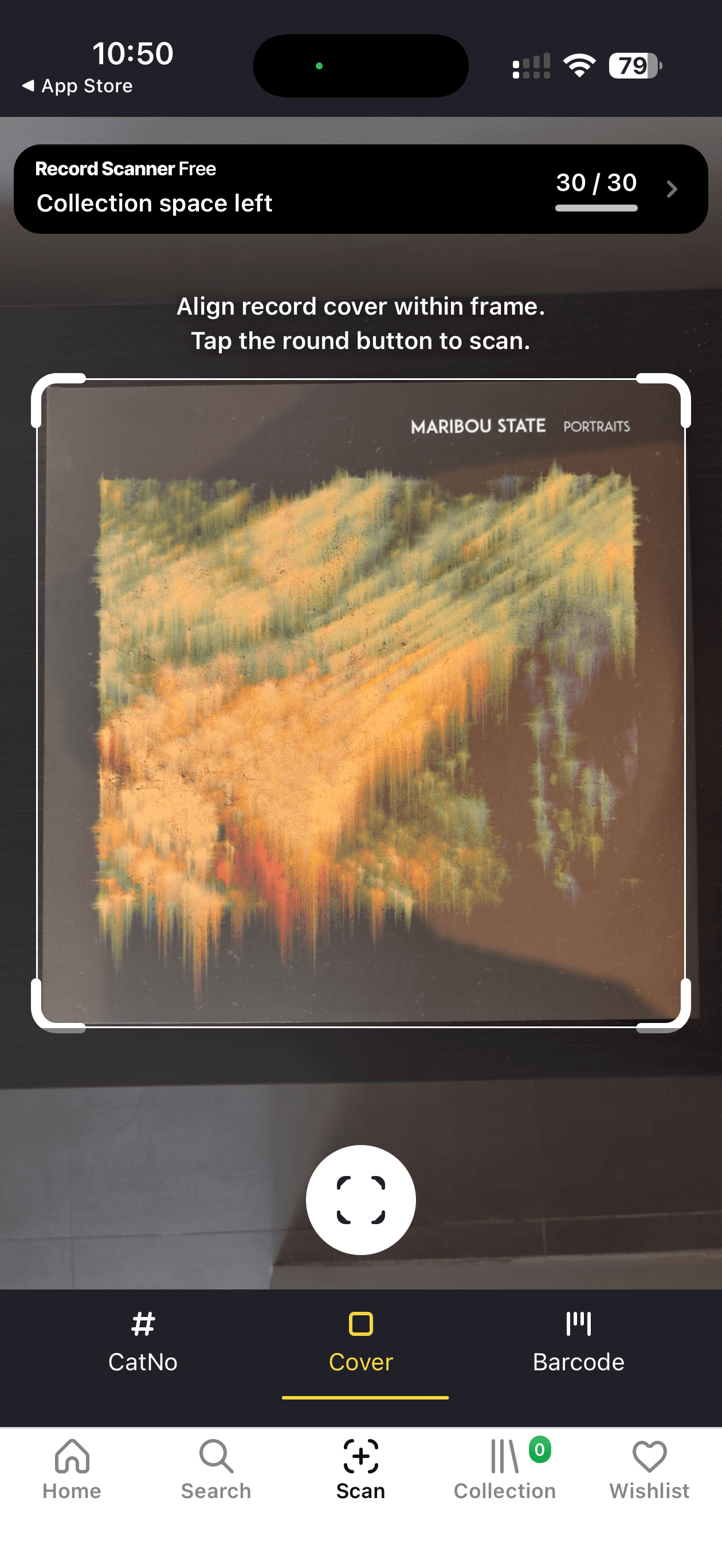
Record Scanner's distinguishing feature is cover scanning. Most catalog apps require a barcode or text search; Record Scanner can identify a record by pointing the camera at the front cover. This is the workflow that matters at a record shop, where barcodes are often worn, missing, or covered by stickers. Point, scan, get a market value estimate and pressing details in seconds, decide whether to buy.
Once a record is identified, the app immediately shows the relevant decision-making information: market value from Discogs sales history, condition-grade pricing, and whether the record is already in your collection (the most common reason to put it back on the shelf). A recent update added a Home screen that consolidates collection stats, total value, and a random-pick prompt for rediscovering records you already own.
For active diggers and store-crawlers, Record Scanner is worth installing alongside whichever Discogs companion you have settled on. For collectors who mostly buy online, it duplicates features the companion already covers.
7. Analog: Live Follow-Along and AI Listening Sessions
The apps above are all about the records on your shelf and the records you are deciding to buy. Analog, which I built, is the app for a different moment: the side that is actually spinning on the turntable right now. It connects to your Discogs collection and does two things the other apps in this guide do not.
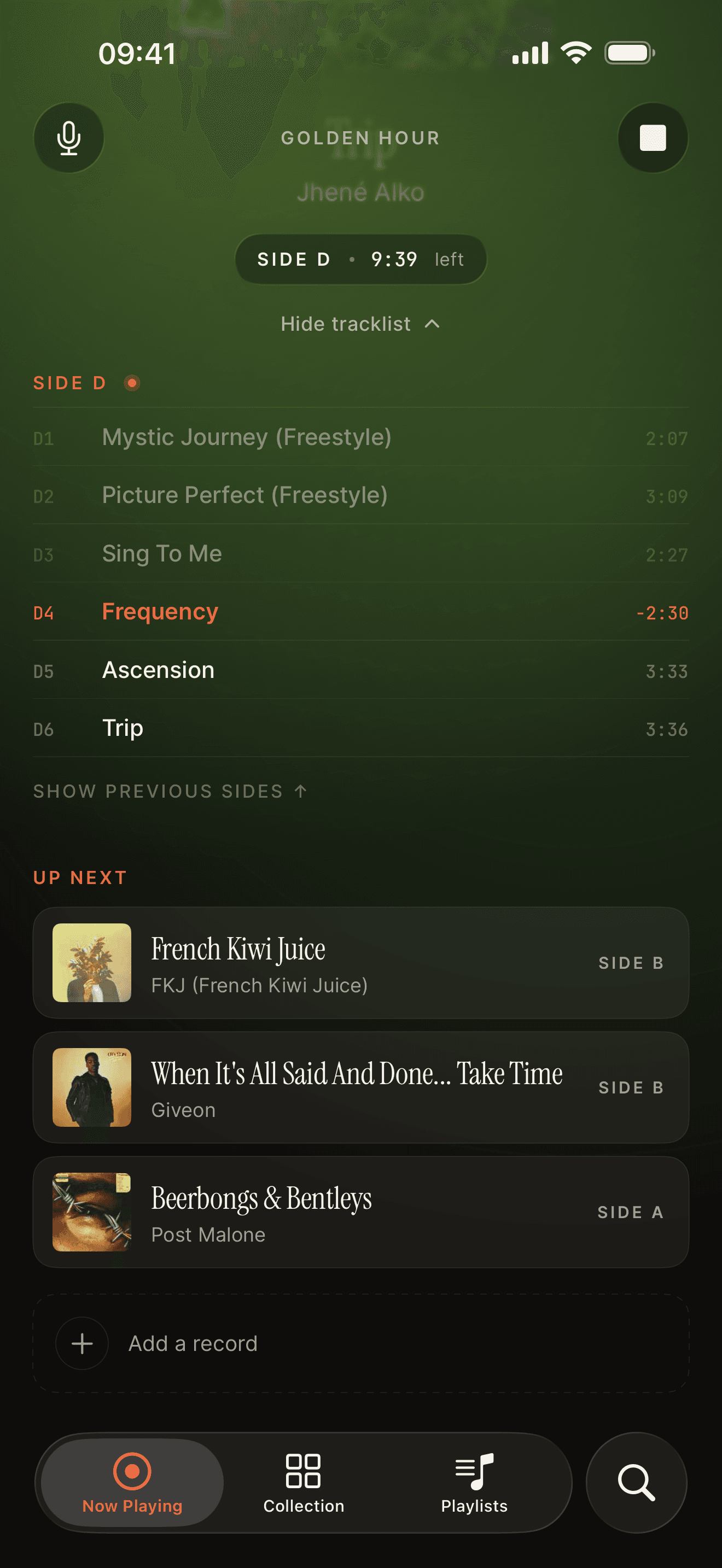
The first is a live follow-along on the side you are playing. Drop the needle, and Analog shows on the Lock Screen, the Dynamic Island and your Apple Watch which side is on, which track is playing right now, and how far through the side you are. The progress updates in real time the way Apple Music's Now Playing does for streamed music, but for the records on your own turntable. Walk away to make coffee, glance at your Lock Screen or your wrist, and you can see exactly what is playing and how far through the side you are without picking up the sleeve.
This is worth being precise about, because it sounds similar to features in other apps but is not the same. Last.fm scrobbling tells your listening history what you played, retrospectively. VinylBox's Shazam integration tells you what album is playing on any speaker, anywhere, useful for adding a record to your wantlist after hearing it at a friend's house. Analog's follow-along is different from both: it stays with the side on your specific turntable for the full duration, tracking position track by track, and it powers the session feature below. Different problems, complementary features.
The second is AI-curated listening sessions through Analog Studio. Pick a mood, describe a moment (a slow Sunday morning, a dinner with friends), or seed the session with a few favorites, and Studio builds a complete listening session from records you already own. The output is a sequenced playlist of vinyl sides from your shelf, curated for the moment you described rather than randomly shuffled. As you play through it, the same live follow-along tells you when to flip and which record is coming next, so the session feels continuous rather than something you have to manage with a notebook. For collectors with a few hundred records who end up reaching for the same fifteen, this is the feature that gets the rest of the collection back into rotation.
The pricing is honest about which part is which. The collection sync, the live follow-along, the progress tracking, the Lock Screen Live Activity and the Apple Watch app are free, with no usage limits. Studio is the paid tier at $4.99 a month or $29.99 a year with a 7-day free trial.
Analog is not a catalog management app and does not try to be. The collection view is intentionally simple because the assumption is that you use one of the apps above (VinylBox is my pick) for daily catalog management. Analog is the listening companion that pairs with whatever Discogs-based manager you have settled on. That is the right division of labor.
Requirements: an iPhone or an iPad, and a Discogs account with your collection synced; with an iPhone, the Apple Watch app comes along too. The follow-along works with any turntable; the built-in microphone does the work.
How to Actually Pick
The right app stack depends on how you actually collect. Some collectors need one app, some need three, and the difference is not about commitment level but about which parts of collecting matter to you. Combinations that work, by collector type:
Casual collector with a few dozen records and no plans to sell: Discogs Official alone. The other apps are upgrades to friction that doesn't yet exist for you.
Active manager with a real shelf they are still growing: VinylBox plus Discogs Official, and Analog if you want the listening experience served too.
Privacy-conscious collector who hates subscriptions: Discographic plus Discogs Official.
Cross-platform power user with Mac, Windows, or web workflows: CLZ Music plus Discogs Official.
Multi-format collector with vinyl, CDs, and tapes: MusicBuddy plus Discogs Official. Or iCollect Music if movies and books are also on the shelf.
Dig-heavy buyer who shops in stores, fairs, and estate sales weekly: VinylBox plus Record Scanner.
The listener who has a collection they love and rarely buys: Discogs Official plus Analog.
The mistake worth avoiding is installing six of these apps and using none of them. Pick the ones that fit how you actually collect, set them up properly, and the rest can stay out of your way.
A Closing Note
Most differences between vinyl apps are smaller than the marketing makes them sound. They all sync with Discogs, they all scan barcodes, they all hold a collection. What separates them is what each app lets you do beyond the catalog: VinylBox's Shazam identification and marketplace selling, Discographic's offline mode and one-time payment, CLZ's cross-platform reach, MusicBuddy's multi-format handling, Record Scanner's fast scan-and-decide flow, Analog's live follow-along on the turntable and AI sessions.
Start with Discogs Official because you will end up with it anyway. Add one of the others when the friction in the official app starts to show up daily. And add Analog when you realize the catalog is only half the picture, and that what happens when the needle drops deserves an app too.
If you are still building your collection, our guides to starting a vinyl collection and cataloging it on Discogs cover the ground around this one. And since every one of these apps is only as good as the deck it sits next to, the guide to setting up a turntable covers the hardware side.