
If you collect records for long enough, every road leads to Discogs. Someone tells you to look up what a pressing is worth, or you want to know which version of an album you own, or you go hunting for an out-of-print record and the trail ends at a Discogs listing. It is the closest thing the music world has to a central reference, and for a newcomer it can look sprawling and a little intimidating.
It is simpler than it looks. This guide explains what Discogs actually is, then walks through every part of it a collector uses, screen by screen, so that by the end you can navigate it with confidence. Where a task deserves a guide of its own, this article points you to one.
What Discogs actually is
The name is short for discographies, and that hints at what it started as: a catalog. But today Discogs is really three things sharing one website.
It is a database, a vast user-built catalog of nearly every music release ever made. It is a collection and wishlist tool, a free place to log the records you own and track the ones you want. And it is a marketplace, one of the largest in the world for buying and selling physical music. Most collectors use all three, and they reinforce each other: the database makes the marketplace precise, and your collection is built from database entries.
Discogs began in 2000 and has grown into a catalog of well over nineteen million releases across every format and genre, from vinyl and CDs to cassettes and beyond. Creating an account is free, and using it as a collector costs nothing.
The database, and the one idea that matters most
Everything else rests on the database, so it is worth understanding first.
The database is built and maintained by its users, wiki-style. Collectors submit releases, add tracklists, credits, photos, barcodes, and the matrix codes etched into a record's runout, and the community checks the work. Nobody at Discogs typed in nineteen million records. Collectors did, one release at a time.
The single most important idea in the database is the difference between a master release and a release. A master release is the album as a concept: every version of it grouped together. A release is one specific physical edition: a particular pressing, from a particular year, in a particular country, with its own catalog number. A famous album can have hundreds of separate releases under one master. The Saturday Night Fever soundtrack, for example, has more than four hundred.
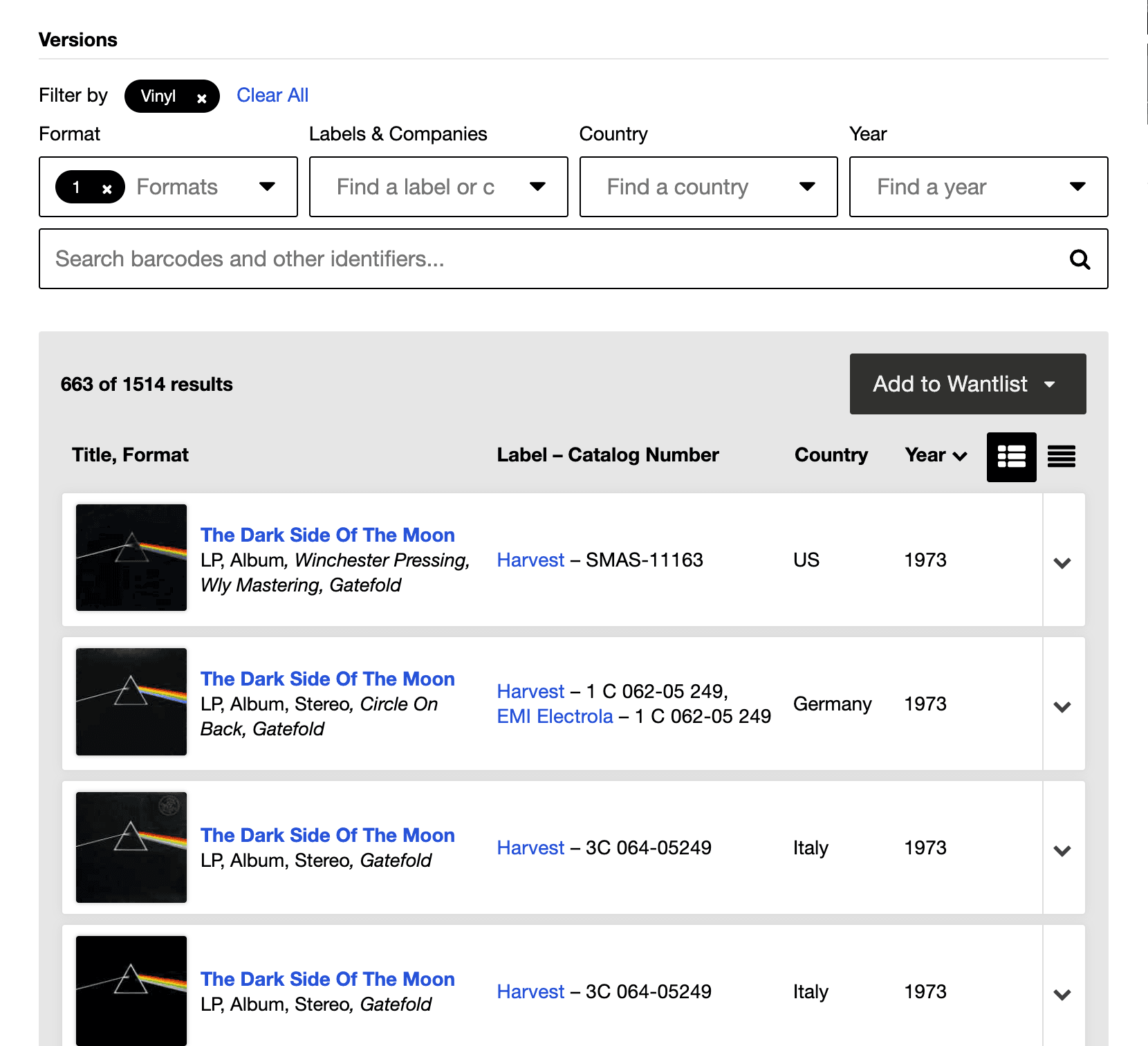
This is the detail beginners most often miss, and it matters. Two copies of the same album can be different releases worth very different amounts. When you log a record or buy one, you are not choosing the album, you are choosing the exact release. If you are not sure how to tell your pressing apart from the others, our guide to identifying which pressing you own walks through the clues, from catalog numbers to deadwax matrix codes.
Setting up your account
Sign up for a free account, and you immediately have two personal lists.
Your Collection is the private catalog of records you own. Your Wantlist is the list of records you are hunting for. They work the same way, and together they are the backbone of how you use Discogs as a collector.
You can use Discogs from a web browser or from the free Discogs mobile app, and everything syncs between them. Set up the account on whichever you prefer; the rest of this guide applies to both.
Finding your way around: search and the release page
Two things make up almost all of the navigation you will ever do on Discogs: searching, and reading a release page.
Searching. The search bar runs across the top of every page. You can search by artist and album, but the two most precise searches are by catalog number and by barcode, because each points to specific releases rather than a whole discography. In the mobile app the search bar also has a barcode-scanner icon: tap it, point your camera at a record's barcode, and Discogs pulls up the matching entries. Once you have results, filters down the side let you narrow by format, year, country, and more.
The release page. This is the page you will spend the most time on, and at first glance it is dense. It is worth learning to read.
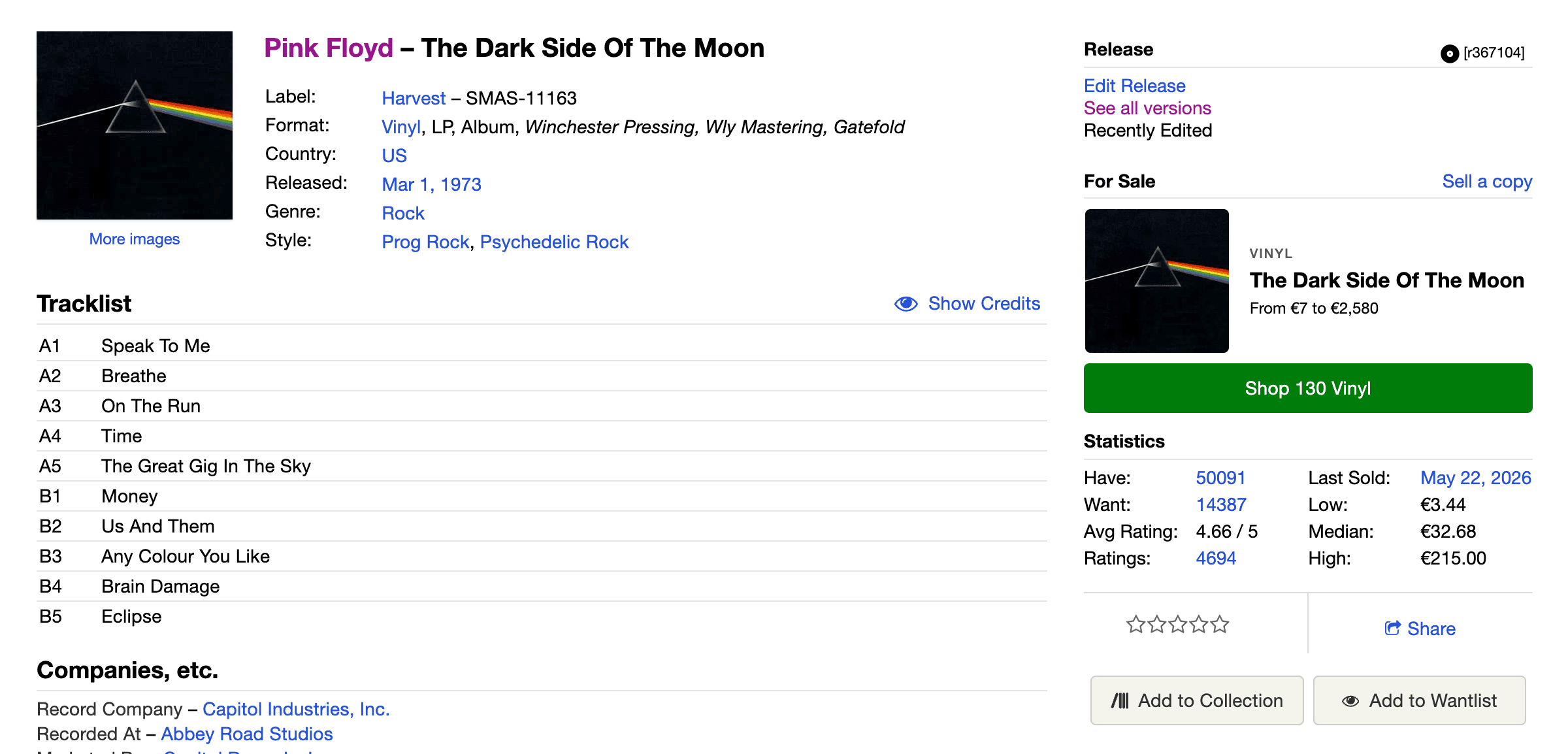
Near the top you will find the artist, title, label, catalog number, country, year, and format. There is a link to the master release, which takes you to the Versions list of every other edition of the same album, and this is how you move between a specific pressing and the wider family it belongs to. Below sit the tracklist and the credits, the musicians, producers, and engineers, all contributed by users. Buttons let you add the release straight to your Collection or your Wantlist. Further down are two sections every buyer should know: the Marketplace listings, showing copies currently for sale, and the Statistics, showing what the record has actually sold for in the past. More on both of those below.
Learn the release page and you have learned most of Discogs.
Cataloging your collection
Logging your records into your Collection is one of the most rewarding things you can do on Discogs. A cataloged collection tells you what you own, what it is worth, and where to find it, and it stops you buying a record you already have.
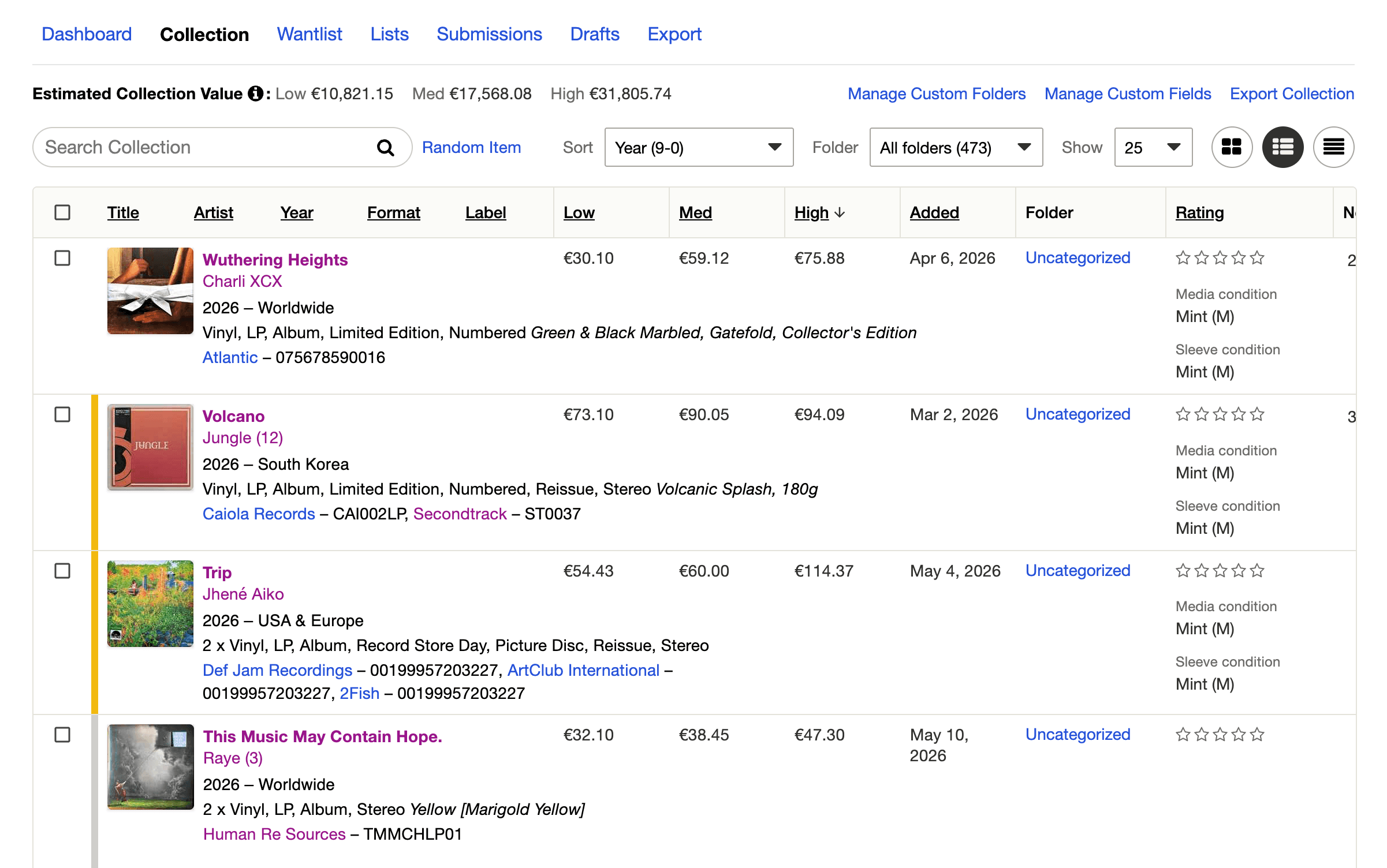
Cataloging well is a craft of its own, mostly because of the master-versus-release distinction above: the value of the exercise depends on matching each record to the correct release. Rather than repeat all of that here, our complete guide to cataloging your collection on Discogs covers the whole process, from scanning barcodes to grading condition to organizing with folders.
The Wantlist
The Wantlist is quietly one of the best features on the site. Add a record you are looking for, and Discogs can email you when a copy is listed for sale, with filters so you only hear about copies in the country, condition, or price range you care about.
For a record that rarely surfaces, this turns hunting from a chore into a standing order. You add it once and forget it, and one day a notification arrives. Build your Wantlist as you go, every time you think "I would love to find that."
Buying records on the Marketplace
This is what brings most newcomers to Discogs. The Marketplace works much like eBay or Amazon: sellers list copies of a specific release, and you buy from them directly. Here is how a purchase goes, start to finish.
Find a copy. From a release page, the Marketplace section lists every copy currently for sale, usually sorted so the best combination of price and condition sits near the top. Each row is one seller's copy.
Read the listing. Two things on every listing deserve a careful look.
The first is condition, graded on the Goldmine standard the whole record trade uses. It runs from Mint, through Near Mint, Very Good Plus, Very Good, and down to Good, Fair, and Poor. Most decent used records sit at Near Mint, VG+, or VG. The disc and the sleeve are graded separately, so a listing might read "VG+ / VG", meaning a Very Good Plus record in a Very Good sleeve. Sellers often add a comment describing specific flaws, and it is always worth reading.

The second is the seller. Open the seller's profile and look at their rating, the feedback left by past buyers, their location, and their shipping and return terms. A long history of positive feedback is reassuring. A brand-new account with no feedback at all is worth a little caution. You can message a seller with questions about a record before you buy.
Check the price. To judge whether a price is fair, scroll to the release page's Statistics section. It shows what copies have actually sold for over time, as a low, median, and high figure, along with the dates of recent sales.
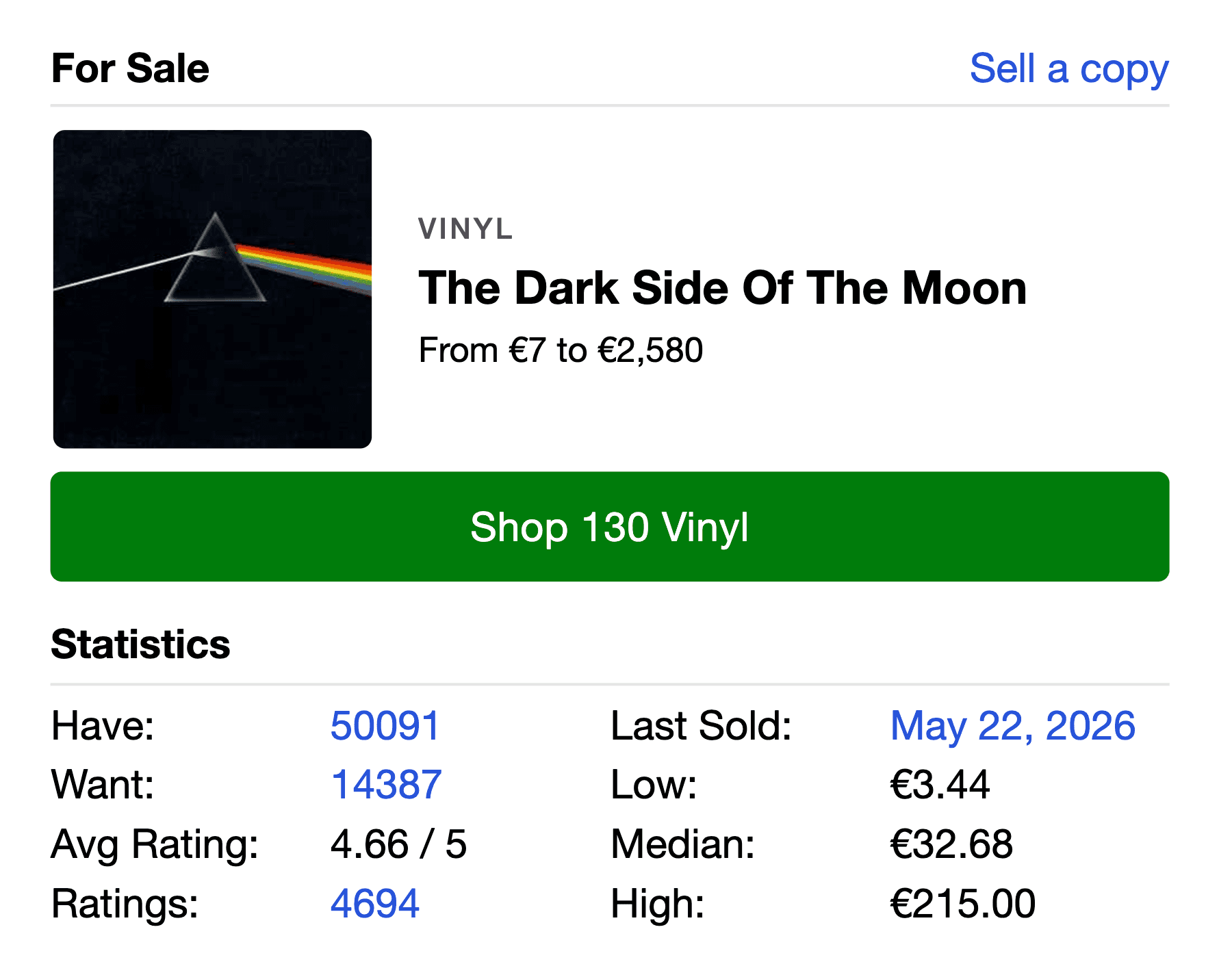
That sales history is far more reliable than the prices of copies currently listed, because a listing price is only what a seller hopes to get, not what anyone has paid. Many listings also carry a Make Offer option, which lets you propose a lower price; a polite offer somewhat below the asking price is a normal part of how the Marketplace works.
Order and pay. Add a copy to your cart, and if a seller has more than one record you want, you can buy them together so they ship in one parcel, which saves on postage. Pay through Discogs' own accepted payment methods, which include cards and PayPal-backed payment. Paying on-platform is important: it gives you protection if something goes wrong, while arranging payment privately off-platform removes that safety net entirely.
Shipping and what comes after. Tracked and insured delivery is worth preferring. If the seller is in another country the parcel can take a while, and a cross-border order may attract customs or import charges on arrival, which the buyer usually pays; factor that into the real cost. When the record arrives, leave the seller feedback. Feedback is a two-way street on Discogs, sellers rate buyers too, so paying promptly and communicating well builds your own reputation.
Selling records on the Marketplace
When you are ready to sell, whether it is duplicates from your collection or records you have outgrown, Discogs makes it straightforward.
Setting up. Creating a seller account and listing items is free; you only pay when something sells. To sell you will need a verified PayPal account and shipping policies set up for the countries you are willing to post to, so Discogs can quote postage to buyers automatically.
Listing an item. Find the exact release you are holding in the database, matching the copy in your hands to the right entry rather than a similar one, then list it from that release page. You set the media and sleeve grades, the price, and a comment describing any flaws honestly.
The fees. The Discogs selling fee is 9% of the item price plus shipping, with a small minimum and a cap of 150 dollars per item. On top of that sits a separate payment processing fee, typically around 2.9% plus a small fixed amount, and depending on where you and your buyer are, tax such as VAT may apply. Knowing the full picture in advance keeps your pricing honest.
Pricing. Price from the sales history, not from the highest current listing. The most common new-seller mistake is pricing a record at or above the dearest copy already for sale, which usually means it sits unsold for months. If recent sales cluster around 40 dollars, that is the real price, whatever optimistic sellers are asking.
Contributing to the database
Because the database is built by its users, Discogs lets you contribute to it, and at some point you will probably want to. When you hold a record that genuinely is not in the database, you can submit it. When you spot a missing credit or a wrong detail, you can edit it.
Submissions and edits are reviewed by the community. Other users vote on your contribution, grading it on a scale from incorrect to correct and complete, and the ability to vote is earned over time through regular, accurate participation. If you are new to contributing, keep submissions simple and correct, use the submission notes to explain anything unusual, and lean on the Quick Start guide and the database forum when you are unsure. Contributing is how the catalog stays good, and a more accurate database makes the site better for everyone, including you.
The Discogs app
The free mobile app puts the whole platform in your pocket, and it has one feature that is genuinely useful in the wild: the barcode scanner mentioned earlier. Standing in a shop or in front of your own shelves, you can scan a record's barcode, pull up its database entry, and add it to your Collection or Wantlist on the spot. It is the fastest way to catalog modern records and to check, mid-dig, whether you already own something.
Your first fifteen minutes on Discogs
If you would rather just start, here is a short path that teaches the site by using it:
Create your free account. Search for an album you own, find the release that matches your copy, and add it to your Collection. Do that for nine more records, so you have ten and a feel for matching releases. Search for a record you have always wanted and add it to your Wantlist, then set an email alert on it. Finally, open that record's Marketplace section and Statistics, and read a few listings and the sales history side by side. In fifteen minutes you will have used the database, the Collection, the Wantlist, and the Marketplace, which is the whole platform in miniature.
Beginner mistakes worth avoiding
A few errors trip up almost everyone at the start, and all of them are easy to sidestep once you know they exist.
The big one is treating two copies of an album as the same thing. They are different releases with different values, and matching the wrong one quietly corrupts your collection and confuses your buying and selling. As a seller, pricing above the sales history rather than from it is the next most common, and it leaves records unsold. As a buyer, skipping the seller's feedback or being tempted into paying off-platform removes the protections that make the Marketplace safe. It is also worth knowing that counterfeit pressings exist; if a scarce record is listed unusually cheap by a seller with little history, slow down and ask questions before buying. None of these are complicated to avoid. They just need a little attention the first few times.
Why it is worth learning
Discogs rewards the effort. Once you are comfortable with it, you have a precise catalog of what you own, a standing watch for the records you want, a fair-price reference for anything you buy or sell, and access to one of the deepest marketplaces in music. It quietly becomes the spine of how you collect.
It also becomes the foundation for the tools you use to enjoy your records. Analog is one of them. It connects to your Discogs collection and turns it into a companion for listening: it recognizes the record on your turntable, follows the tracklist as it plays, and builds listening sessions from records you already own. The better you know Discogs, and the more accurate your collection there, the more those tools can do.
Start small, with those first ten records. The rest of it will make sense from there.