
A streaming app always knows what it is playing: the album, the track, how far along you are, what comes next. Put a record on and your phone knows none of that. The music is in the room, but as far as the phone is concerned nothing is happening. The app that closes that gap is a listening app that knows your collection. Analog, which I built, is one: it hears the record on your turntable, finds it among the records you keep on Discogs, and from then on knows the album, the side, the track that is playing and how long is left before you have to get up and flip. It puts all of that on the Lock Screen, in the Dynamic Island and on your Apple Watch, and when the side runs out it suggests what to play next from your own shelf.
This guide explains what that looks like in practice, why the song recognition apps most people try first get you a name but not your record, what collectors build when no app does the job, and where the limits are. At the end there is a note on a different question that gets searched with the same words: working out which pressing you are holding.
What the phone should know
The standard is the one streaming set. When a record is playing, a phone that really knows what is playing can tell you four things: which record it is, and specifically which copy in your collection; which side is on the platter; which track is playing right now; and how long is left on the side. The last two change every few minutes, so the answer has to keep updating, not just appear once.
The side is the unit that matters, and it is a particular shape. Pressing plants cut a 12-inch side to about 18 to 20 minutes, and that stretch has a running order, a track that comes next, and an end you have to get up for. The name of the album is where knowing what is playing starts, not where it finishes. An app that can only give you the name has done the easy part.
Where song recognition stops
Song recognition apps listen for a few seconds, boil what they heard down to an acoustic fingerprint, a condensed summary of the sound, and match it against a database of fingerprints taken from millions of recordings. The method is built to tolerate compression, transmission artifacts and background noise, which is why it works from a record with a little surface crackle as well as from a radio. Ten seconds and you have a track and an artist.
Some collector apps build the same idea in. VinylBox, the Discogs companion I recommend in our roundup of apps for vinyl collectors, has a music recognition mode that finds the vinyl or CD of the album you are listening to, so you can add it to your collection or wantlist on the spot. For a record shop's listening station or a friend's living room, that is exactly the right feature.
For your own turntable it stops short, and the limit is built into the method. A recognition app identifies a recording, not a copy: a 1971 original and a 2019 reissue of the same album carry the same recording, so they are identical to it, and it has no idea which one you own. It also answers once and then stops. It does not know that the song it heard belongs to a side, which track comes next, or that the side ends in four minutes. A side is twenty minutes of motion with a structure, and staying with it is a different job from naming a moment of it.
What collectors build when no app does the job
You can see how much people want this from what they build. VinylPi64 runs on a Raspberry Pi Zero 2 W wired to a USB turntable, identifies the music through a song recognition service, and paints the album art with the artist and title onto a 64 by 64 pixel display next to the deck. A Home Assistant user built a Vinyl Listener that takes the turntable's signal through a USB audio interface, identifies each track, shows it on a small screen and scrobbles it to Last.fm.
Both are good projects, and both show the shape of the problem. They need a turntable with a USB output or an interface in the signal chain, a computer running next to it, and a recognition service that still names one song at a time, re-arming itself after the silence between tracks. They do not know which of your pressings is on the platter, or which side. A phone can do the job without any of that hardware, because it has a microphone, a screen you already glance at, and, if you keep your collection on Discogs, a list of every record you own.
How Analog does it
Analog starts from your Discogs collection rather than from a catalogue of every recording ever made. Connect your account, and the app has your records and their tracklists. Put one on, tap the mic (or ask Siri, press the Action Button, or use Control Center), and it listens through the iPhone's microphone and matches what it hears against your own shelf. Within moments it has the record and the side, and Now Playing shows the cover, the side, the time left on it, and the track that is playing, counting down.
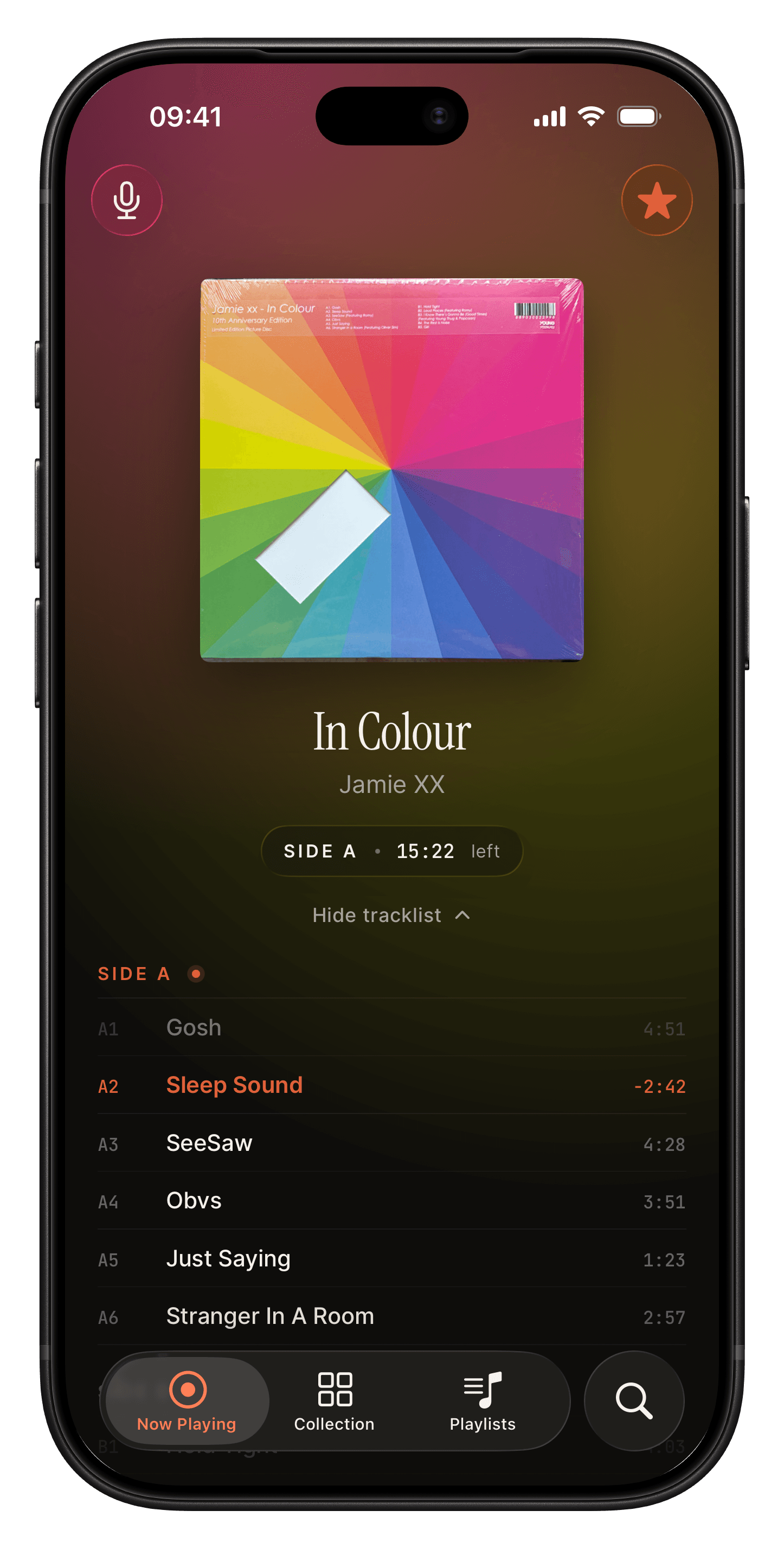
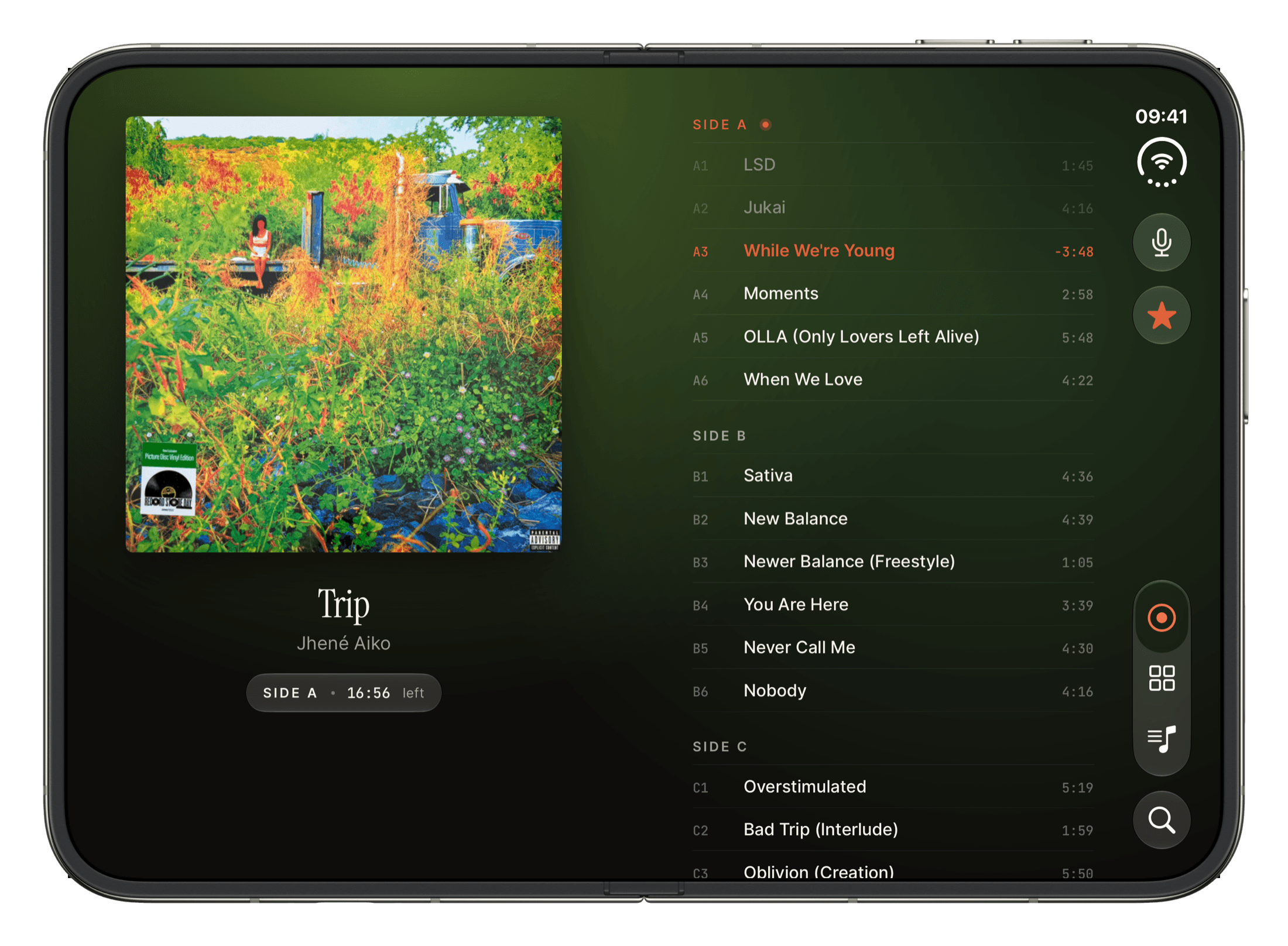
From there you can put the phone down. The Lock Screen and the Dynamic Island carry the same information as a Live Activity, so a glance tells you which side is on and how much of it is left. On Apple Watch, the same side and countdown sit on your wrist, and you can identify a record from the Watch itself with the phone in another room. On iPad the cover sits beside the tracklist, and on iPhone Duo the record takes one side of the open screen and its tracklist the other.
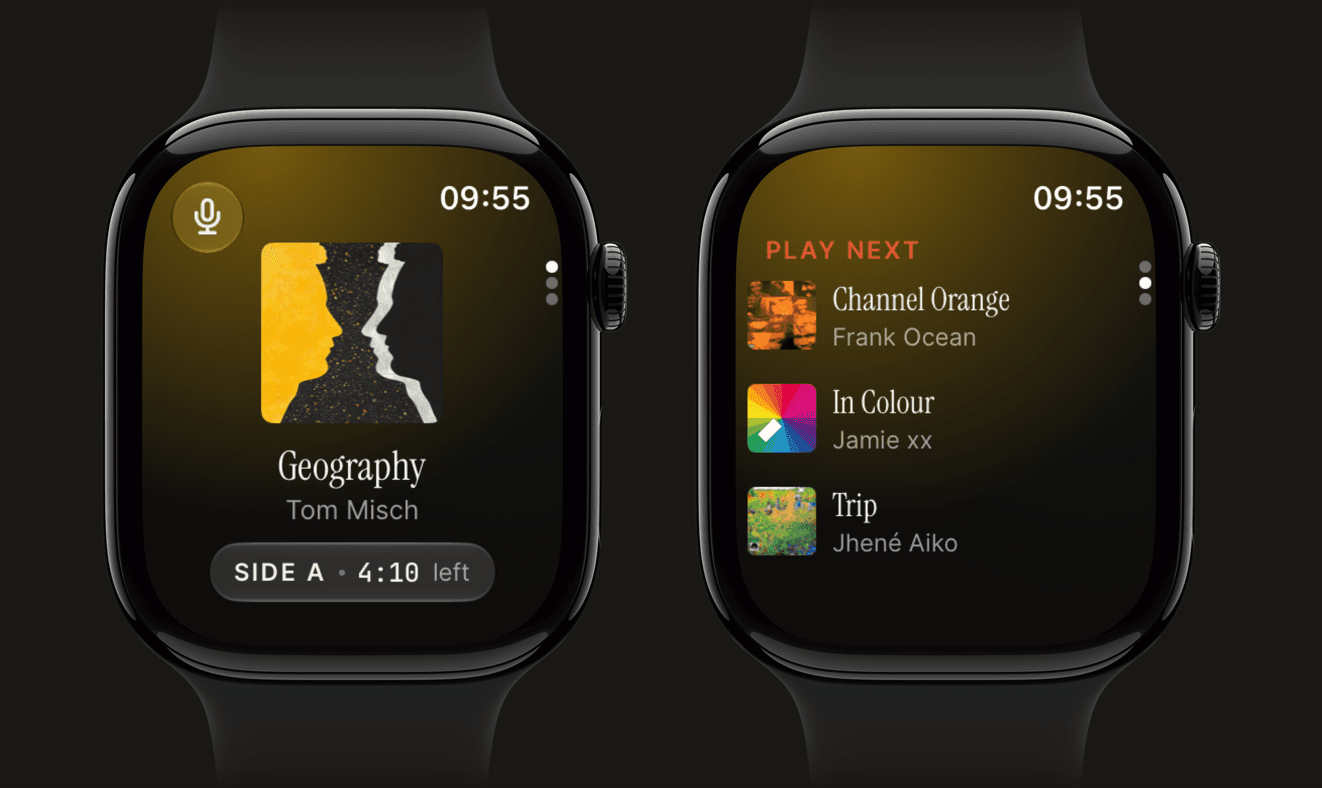
Because it is matching against your collection, Analog is not guessing among millions of recordings. It knows which of your records is spinning, down to the copy you logged. Knowing the shelf and following the side also lets it do something neither a recognition app nor a catalog app can: suggest what to play next. Beside the record that is playing, it offers picks from your own collection, on the iPhone and on the Watch, so the end of a side is a decision already half made rather than a trip to the shelf with no plan. For a whole evening, Analog Studio builds a listening session from records you own, by mood, by occasion, or from a few favourites, chooses the sides and the order, and follows each one as you play it, showing which record comes next. And every side it identifies goes into History, so you end up with a log of the records you play without writing anything down.
What Analog needs
Analog needs a Discogs account with your collection in it, and it works best when that collection is accurate and each record has its full tracklist, since the tracklist is what it follows. If you have not cataloged your records yet, our guide to cataloging a vinyl collection on Discogs is the place to start. It has to be able to hear the record: the listening happens on the device, the microphone is used only while it is actively listening, and your audio never leaves your phone. In a room too loud for it to hear the record over the chatter, you can swipe right on a record in your Up Next queue to mark it as now playing yourself.
It does not play or stream music; the music comes from your turntable, and it works with any turntable, since the microphone does the listening. It runs on iPhone, iPad, Apple Watch and iPhone Duo. Identifying records, the Lock Screen and Dynamic Island follow-along, the picks for what to play next, the widgets and the Apple Watch app are free. Studio is the paid part, at $4.99 a month or $29.99 a year with a seven-day free trial on the yearly plan.
If the question is which pressing you own
The same words get typed by people holding a record they cannot place, and for that question the microphone is the wrong tool. What separates one pressing from another is on the object: the catalog number on the spine and label, the barcode on anything pressed since the mid 1980s, and the matrix codes scratched into the run-out groove. Matching those against Discogs names the exact copy you own, and our guide to telling which pressing of a record you own walks it step by step. Apps help here with the camera: Record Scanner identifies a record from a photo of its cover, or from its barcode or catalog number, then shows the release details and a market value, which is the right tool for a crate at a flea market. Once you know what the record is, Analog is the app that knows when it is playing.
Closing the gap
A turntable will never report back the way a streaming app does, and that is part of its charm. But the phone sitting next to it can listen, and if it knows your collection it can keep up: this record, this side, this track, this much left, and a good idea of what to put on next. That is what an app that tells you what record is playing should do, and it is what Analog was built for.