
The best record collection software for most Mac users is the Discogs website. It is free, it runs in any browser on any Mac, and it holds the same collection as the Discogs app on your phone. If you would rather have a program built for cataloging, CLZ Music Web works on every Mac for $39.95 a year. And if your Mac has an Apple chip, several iPhone and iPad collection apps install on it too, including VinylBox, Discographic and MusicBuddy.
There is less Mac software for record collectors than there used to be. The desktop programs people used for years have stopped being updated or been withdrawn, and most of what the Mac App Store shows when you search for vinyl is a phone app running in a window. This guide covers what works on a Mac today, with every requirement and price checked against the app's App Store listing and its maker's website in November 2026. I make Analog, which has a Mac app. It is in here too, right after Discogs, because it works from the same collection.
Quick picks
| Software | How it runs on a Mac | Price |
|---|---|---|
| Discogs website | In the browser, any Mac | Free |
| Analog | Mac app, macOS 26.1 | Free, Studio $4.99 a month |
| CLZ Music Web | In the browser, any Mac | $39.95 a year |
| VinylBox | iPad app, M1 or later, macOS 14 | Free, Pro from $1.99 a month |
| Discographic | iPad app, M1 or later, macOS 11 | Free, Pro is a one-time purchase |
| Vinyl Record App | iPad app, M1 or later, macOS 15.6 | Free, Premium $5.99 a month |
| MusicBuddy | iPad app, M1 or later, macOS 26 | Free to 50 albums, $9.99 lifetime |
| iCollect Everything | Mac app, M1 or later, macOS 27 | Needs iCollect Pro, $79.99 a year |
Which Mac you have
What you can run depends on the chip in your Mac. Open the Apple menu and choose About This Mac. If the first line says "Chip" followed by Apple M1 or anything later, you have one of the newer Macs, which can run more of what follows. If it says "Processor" followed by Intel, you have an Intel Mac.
On an Intel Mac, the two cataloging options are the ones that run in the browser: the Discogs website and CLZ Music Web. Analog also installs on an Intel Mac that has macOS 26.1. The rest of this guide needs an M1 chip or later.
On a Mac with an M1 chip or later you can install iPhone and iPad apps, when their developers allow it. In the Mac App Store they are under the "iPhone & iPad Apps" tab of the search results, and each listing gives the macOS version it needs. Most carry a "Not verified for macOS" label, which Apple explains as meaning nobody has confirmed the app works fully on a Mac.
An iPad app on a Mac opens in its own window, and you use the keyboard and trackpad where you would touch the screen. It signs in to the same account as on your phone, so your collection is already there. It is still a phone app, though. The layout was made for touch, and the barcode scanner expects a phone camera. Add records on the phone, and use the Mac to browse and edit them.
The Discogs website
Discogs has no Mac app, and its iPhone app is not offered on the Mac. You don't need one. The website has every collection feature, including two the app lacks.
The first is setting up how your collection is organized. Folders and custom fields are created on the website, and the app can only file records into the ones you already have. Custom fields hold your own details, such as what you paid, where you bought the record and which shelf it is on. Our guide to cataloging vinyl records on Discogs goes through setting them up.
The second is the export. From your collection settings, Discogs sends you a CSV file of everything you own, which opens in Numbers or Excel. That file is your backup, and it is what you would use to move to other software.
The website also shows your collection's estimated value, worked out from recent sales of each release. Our guide to what your records are worth explains how to read it.
Most people end up working the same way. They add records on the phone, where the barcode scanner is, and tidy them on the Mac, where the keyboard and the big screen are. It is one account, so there is nothing to sync.
Analog on the Mac
The Discogs website looks after the records on your shelf. Analog, which I make, looks after the one on the turntable. It is a Mac app that works from your Discogs collection, and it needs macOS 26.1 or later.
When you put a record on, Analog listens through the Mac's microphone and tells you which of your records is playing, and which side. It keeps following the side while you work in other apps, with the record, the side and the time left in the menu bar. You don't have to get up and look at the sleeve to know which track is on.
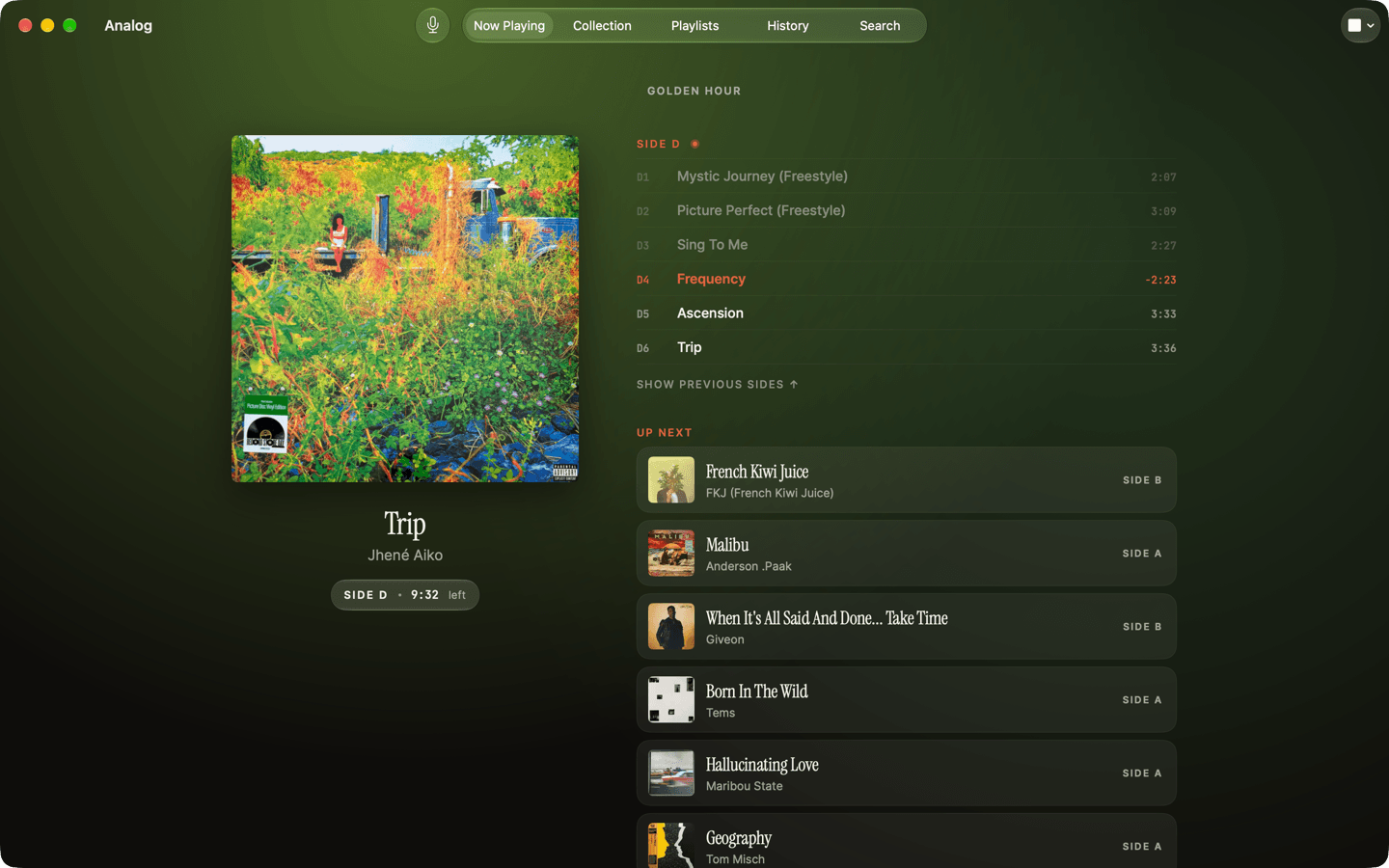
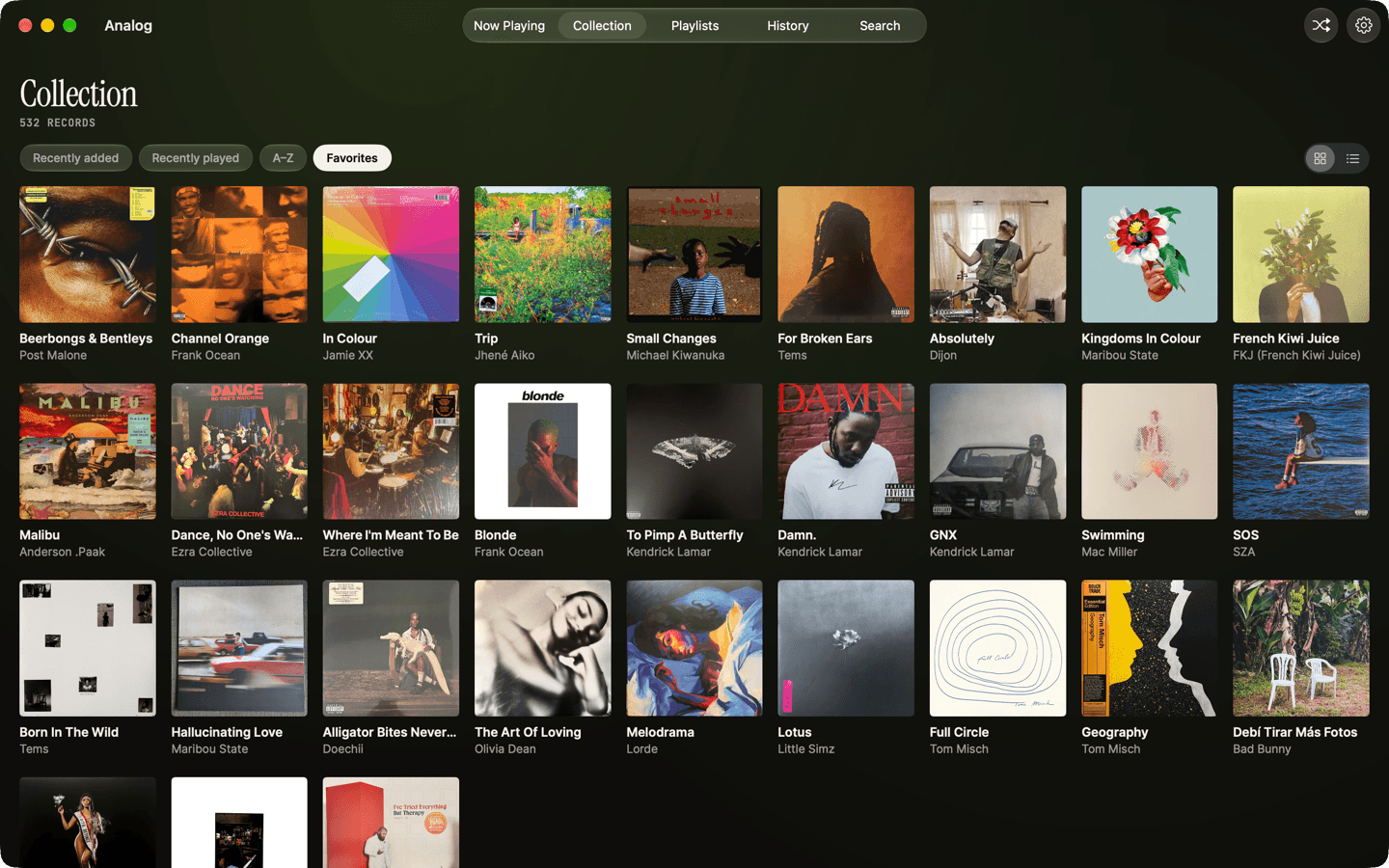
Your whole collection is there too, with its covers, as a grid or a list. You can sort it by what you added or played most recently, keep favorites, and search it.
When the side ends, Analog suggests three records to play next from your own shelf, with a line on why its top pick follows the one you just played. The suggestions are made on the Mac by Apple Intelligence, so they need a Mac with an M1 chip or later. If you can't choose, Pick for Me in the Listen menu chooses one for you, based on what you have been playing lately. That works on any Mac.
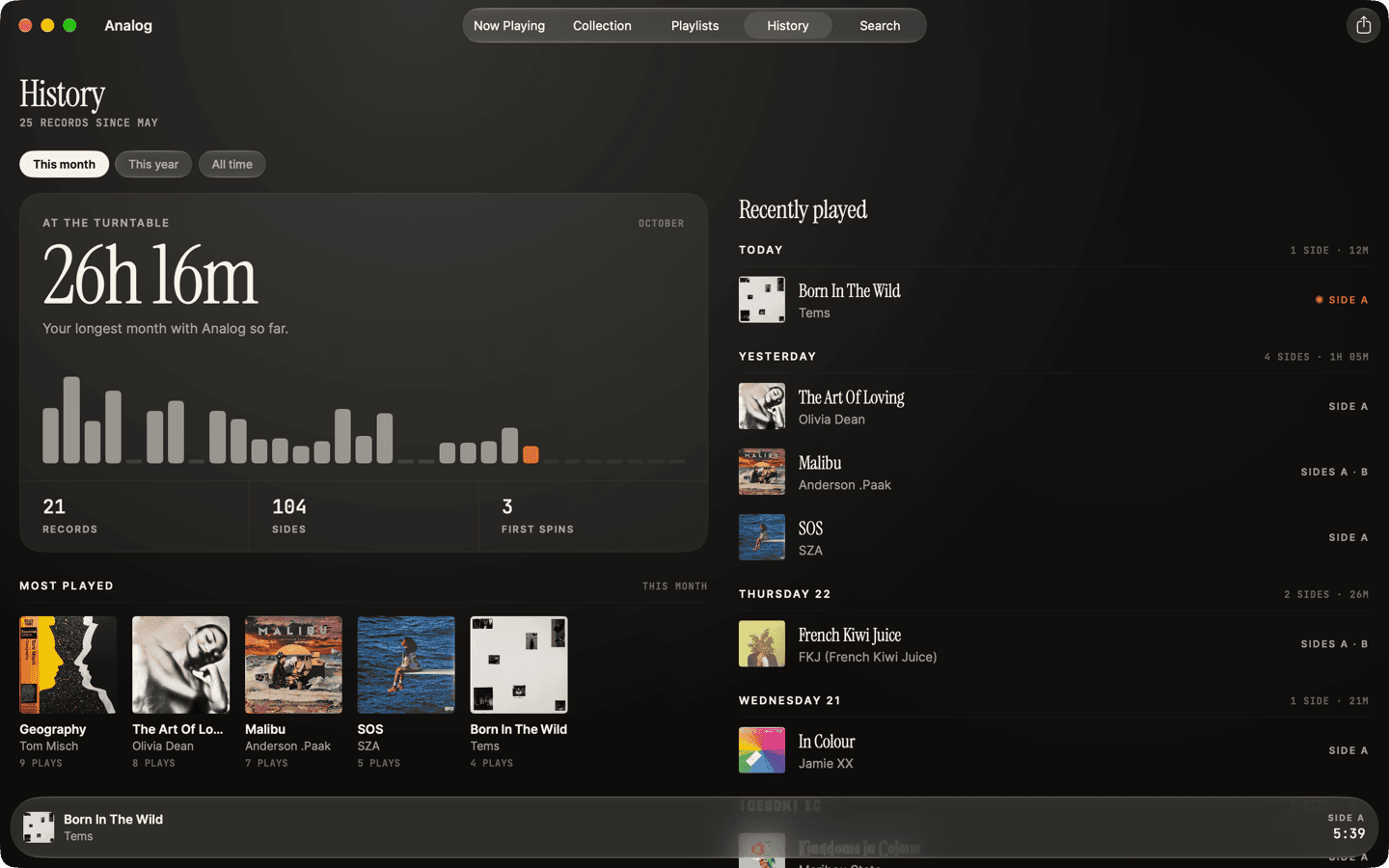
Every side Analog hears goes into its History, so you can see what you have played and how often. Our guide to keeping a log of the records you play covers that. Your collection, playlists and History sync through iCloud between Mac, iPhone and iPad.
All of that is free. Analog Studio is $4.99 a month or $29.99 a year, and one subscription covers Mac, iPhone and iPad. It builds listening sessions from the records you own, like the one in the first screenshot, and lets you open a Jukebox when you have friends over for records, so they can pick the next one from your shelf on their own phones.
Analog is not a catalog manager. You browse your collection in it, but you add and edit records on Discogs or in one of the programs below.
CLZ Music Web
CLZ Music Web is the one dedicated cataloging program that runs on every Mac, Intel included, because it runs in the browser. It costs $39.95 a year after a seven-day free trial, or $49.90 a year together with the CLZ Music phone app.
It was designed for a computer screen. You get a list with the columns you choose, a folder panel on the side, and an edit screen with fields for where a record is kept, what you paid, where and when you bought it, and your notes and rating. You add a record by typing its barcode or searching by artist and title, and CLZ fills in the cover, label, release date and track list. Its search draws on the Discogs database, so it finds records by catalog number too, which matters for older vinyl with no barcode. Your catalog is stored in CLZ's own cloud and syncs with the phone app.
CLZ still updates it regularly. This year it gained track list export and printing, cover thumbnails in the list view and extra images per album.
If you used CLZ's old Mac program, Music Collector, this is what replaced it. Its last feature update was version 20.3 in June 2021.
iPhone and iPad apps that run on a Mac
These need a Mac with an M1 chip or later. Each is covered in more depth, as a phone app, in our roundup of the best apps for vinyl collectors.
VinylBox is the one I would install first if your collection is on Discogs. It signs in to your Discogs account, so there is nothing to import, and it is the collection app I pay for myself. It has around 2,800 ratings averaging 4.7 stars. Pro adds selling on the Discogs Marketplace. It needs macOS 14.
Discographic also works from your Discogs account, and you pay for Pro once. It keeps a copy of your collection and wantlist on the device, so they open without waiting on Discogs, and it shows and edits your Discogs folders and custom fields. It has around 440 ratings averaging 4.7 stars and runs on macOS 11 or later, the oldest system of any app here.
Vinyl Record App keeps its own collection and wantlist, with tags, a shuffle button and a feed of what your friends add. It can import and sync a Discogs collection. It has around 3,600 ratings averaging 4.8 stars, the most of any app here. Premium, at $5.99 a month, adds barcode and cover scanning. It needs macOS 15.6.
MusicBuddy is for a shelf that mixes vinyl with CDs and cassettes. It is free for 50 albums and $9.99 once for unlimited, and it has around 1,100 ratings averaging 4.8 stars. It keeps its own catalog, separate from Discogs. The current version needs macOS 26.
Two more install on a Mac but have little reason to be there. CLZ Music, the phone app, costs $19.99 a year, and on a Mac the browser version above is the better way to use CLZ. Record Scanner is an iPhone app for identifying a record in a shop from a photo of its cover, which is not something you do at a desk.
iCollect Everything
iCollect Everything is a Mac app, the desktop companion to the iCollect Music app for iPhone and Android. It is free to download, but it only works if you are a Pro user of iCollect's mobile apps, which costs $79.99 a year. It needs macOS 27 and an M1 chip or later.
It catalogs music alongside films, books, comics, games and other collections, and syncs them with your phone. That makes it worth a look if you already pay for iCollect Pro, or if records are one of several things you collect. For records alone it is the most expensive option here.
Mac programs that are gone
Two Mac programs that collectors used for years are no longer an option. Delicious Library scanned barcodes with the Mac's camera and showed your records on a wooden shelf. It was withdrawn from sale in November 2024, after Amazon cut off the product data it relied on. CLZ's Music Collector moved to the browser, as described above.
New catalog apps written for the Mac do turn up in the Mac App Store. I have left them out for now. A catalog takes years to build, and I would want to see an app last a few of them first. Whatever you pick, check that it can export your collection before you put hundreds of records into it.
This is also the case for keeping your collection on Discogs and treating everything else as a way of looking at it. If an app goes away, your collection is still on Discogs.
Which to choose
Start with Discogs. If your collection is already there, the website does what most people want from a cataloging program. It costs nothing, and it works on the Mac you have today.
Then add Analog. It works from the same Discogs collection, and it is the only software here that does something while a record is playing. It tells you which record and side is on, keeps the time left in your menu bar, and helps you choose what to play after it. Everything I described above except Studio is free, so you can try it with your own records.
After that, it depends on what you miss. If you sell records, VinylBox adds selling on the Discogs Marketplace. If you would rather pay once than subscribe, Discographic is the one to pick. Both need a Mac with an M1 chip or later. If you want a catalog of your own outside Discogs, with fields for where each record is kept and what you paid, CLZ Music Web is the program built for that, and it runs on any Mac. And if your shelf holds as many CDs and tapes as records, MusicBuddy covers all three for $9.99, paid once.
Whichever you add, keep the collection itself on Discogs. Then you can change apps later without entering a single record again.